Tile Scheduling in CuTeDSL
In CuTeDSL, it is often convenient to use StaticPersistentTileScheduler when writing persistent kernels. In this blogpost I give a brief intro to how it works.
Usage in Kernel
Typical usage within a CuTeDSL program is that we first set up the grid and the scheduler params in a dedicated function:
tile_sched_params = utils.PersistentTileSchedulerParams(
    problem_shape_ntile_mnl,
    self.cluster_shape_mnk,
    swizzle_size=self.swizzle_size,
    raster_along_m=self.raster_along_m,
)
grid = utils.StaticPersistentTileScheduler.get_grid_shape(
    tile_sched_params, self.max_active_clusters
)
Within the kernel we then create the scheduler and use it as an iterator over work tiles:
tile_sched = utils.StaticPersistentTileScheduler.create(
    tile_sched_params, cute.arch.block_idx(), cute.arch.grid_dim()
)
work_tile = tile_sched.initial_work_tile_info()

while work_tile.is_valid_tile:
    # Get coordinate for current tile
    cur_tile_coord = work_tile.tile_idx
    mma_tile_coord_mnl = (
        cur_tile_coord[0] // cute.size(cta_layout_vmnk, mode=[0]),
        cur_tile_coord[1],
        cur_tile_coord[2],
    )

    # DO STUFF

    # Get next tile
    tile_sched.advance_to_next_work()
    work_tile = tile_sched.get_current_work()
The main advantage of the StaticPersistentTileScheduler is that it will:
- Give us a fixed, well-structured schedule of tiles that cover the whole output.
- Avoid launching one CTA per output tile. Instead, a resident CTA or CTA cluster starts from its persistent work index and advances through the tile schedule inside the same kernel.
Linear Work Index
Internally, the scheduler starts each persistent CTA or CTA cluster from a flat linear_work_idx and maps this index to a tile coordinate in (M, N, L). After finishing a tile, the CTA or cluster advances by the number of persistent clusters, so different CTAs walk through disjoint parts of the same global tile schedule.
Visual Understanding
For the sake of visualisation, we will first assume that we have 8 active persistent CTAs. In reality this number is of course larger. For example, on a B200, the non-clustered examples in this tutorial use max_active_clusters=148.
Let's assume we have 4 tiles in M direction, 4 tiles in N direction, and 1 tile in the batch dimension.
We'll now look at some pictures to understand better how StaticPersistentTileScheduler schedules the work based on the given parameters.
If we don't provide any arguments except the problem shape, cluster shape, and the maximum active clusters, we'll obtain something like:
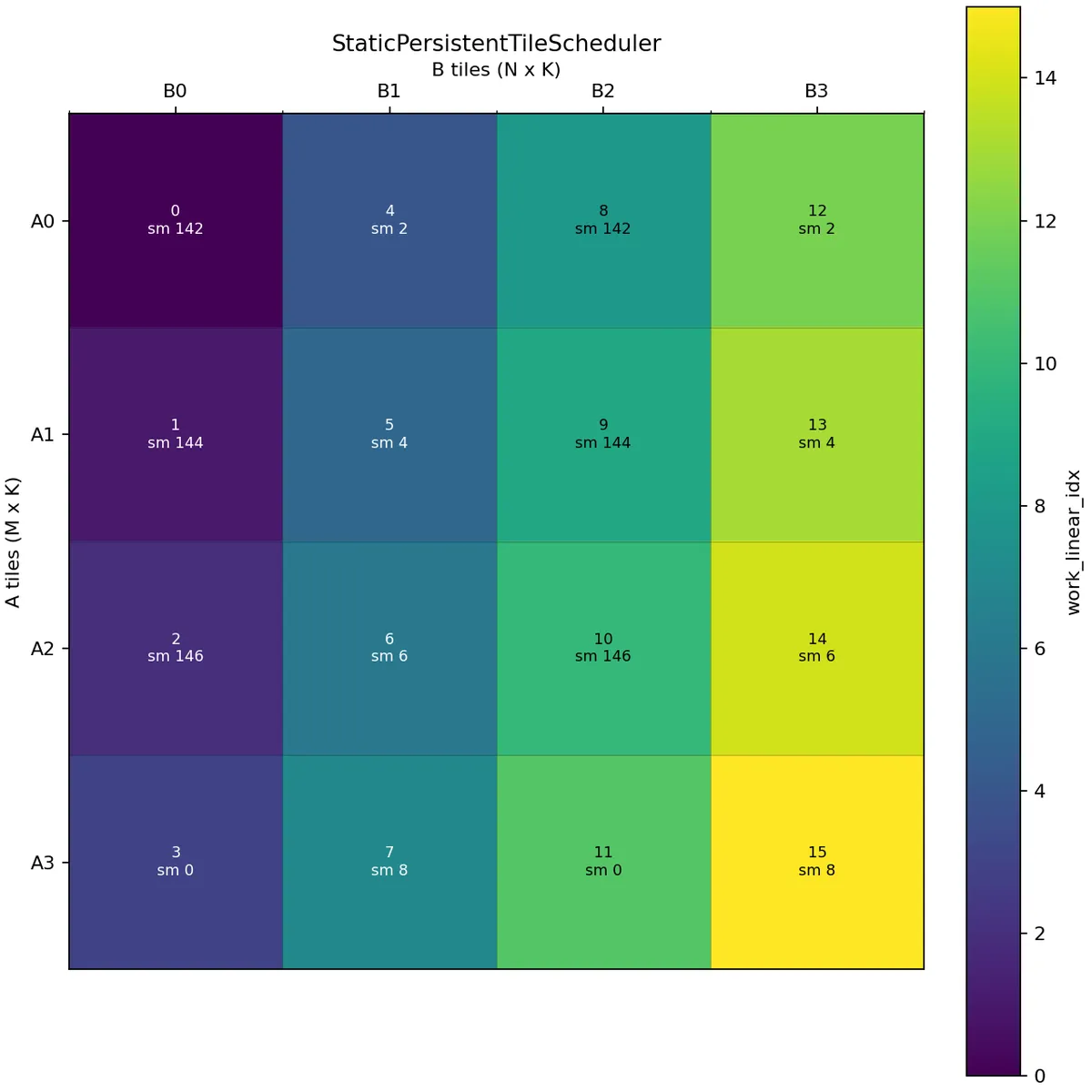
Here we assume A is (M, K):(K, 1) and B is (N, K):(K, 1), i.e. we use the M tiles to get a slice of A and the N tiles to get a slice of B.
In the above picture, the scheduler issues tiles along the M mode and then continues with the next N tile. A wave is one round of all available persistent CTAs. Here the first wave consists of work indices 0, 1, 2, 3, 4, 5, 6, 7, and the second wave consists of 8, 9, 10, 11, 12, 13, 14, 15.
For this 4 x 4 example with 8 active CTAs, the first wave covers B0 and B1 across all A tiles, while the second wave covers B2 and B3. This creates reuse opportunities for the corresponding B tiles within a wave.
We could equally well set raster_along_m equal to False.
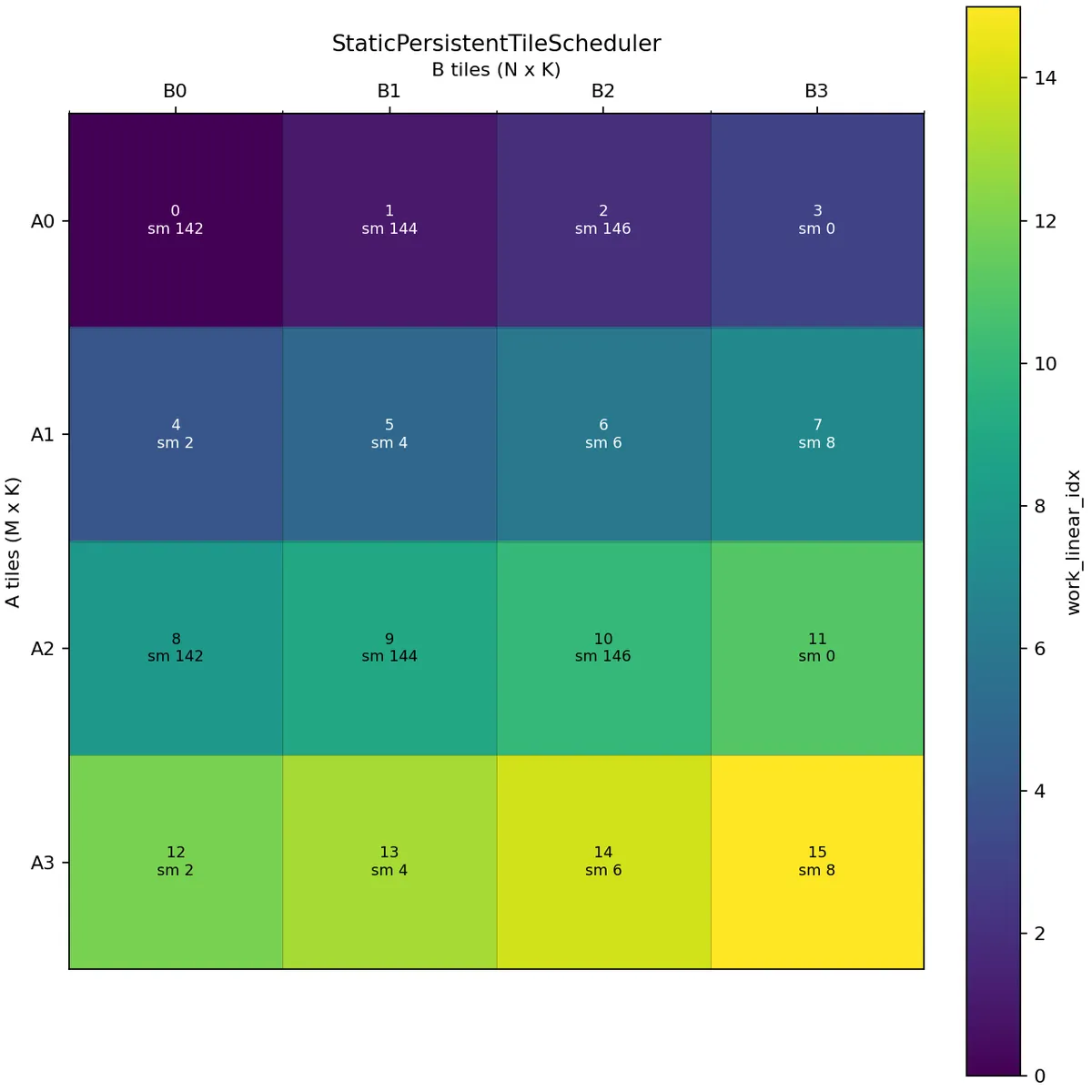
Here we schedule along the N mode. In this case, the first wave covers A0 and A1 across all B tiles, while the second wave covers A2 and A3. This creates reuse opportunities for the corresponding A tiles within a wave.
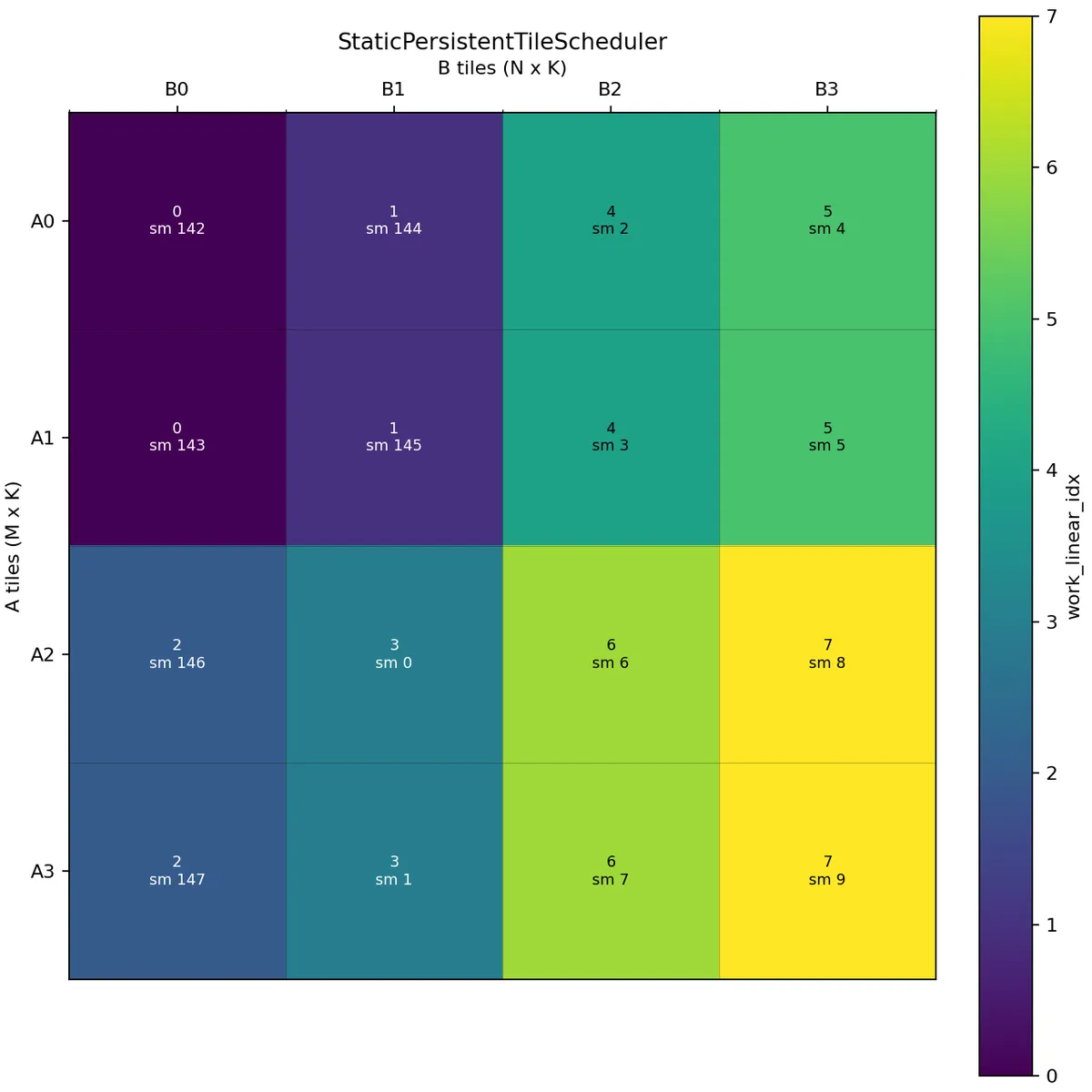
Let us now consider a case where we want to perform threadblock swizzling. We will use swizzle_size=2.
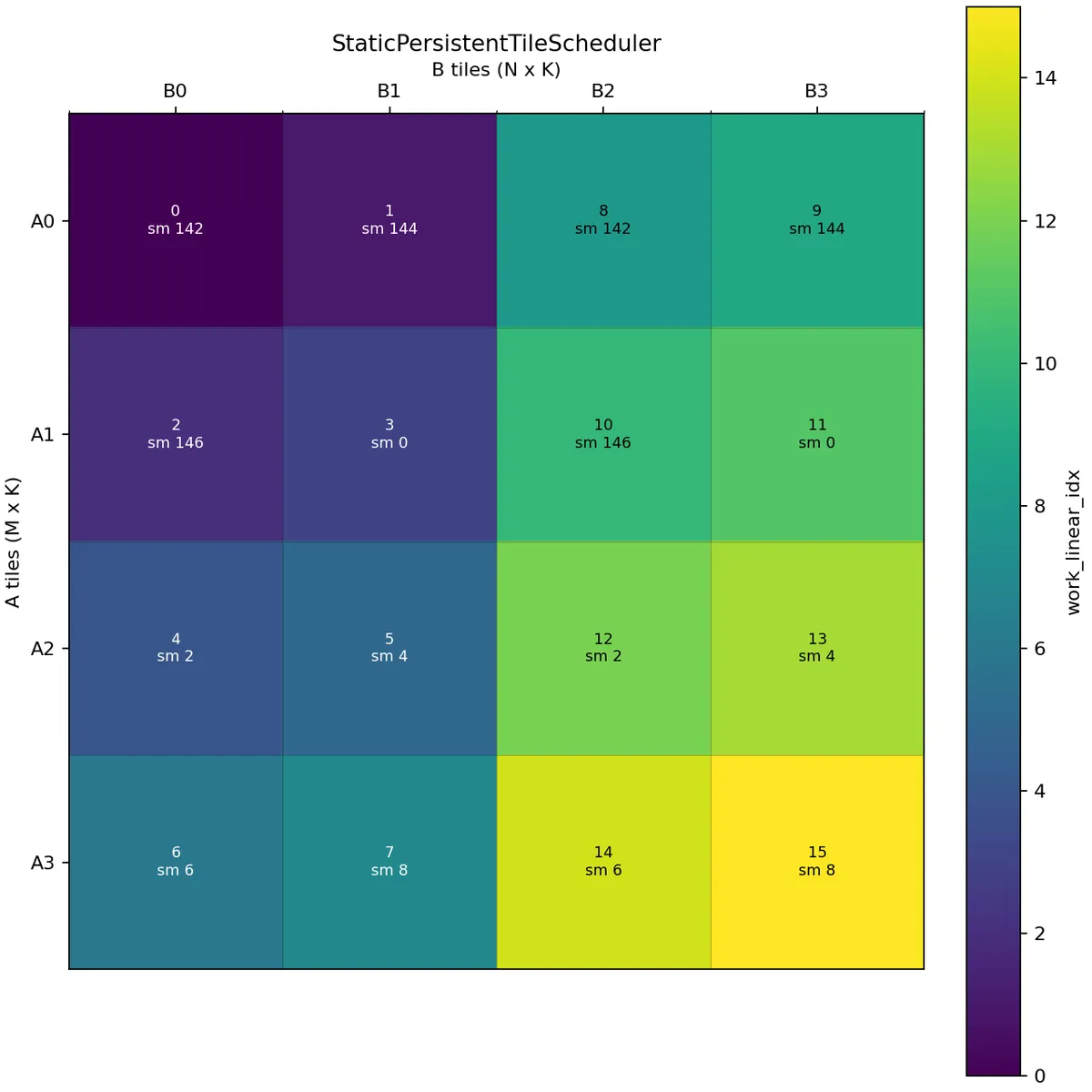
The schedule is now different. With raster_along_m=True and swizzle_size=2, the scheduler first lays out 2 tiles along the N mode and then repeats this pattern until it covers the whole M mode. After that it moves to the next group of N tiles.
In this example, the first wave covers B0 and B1 across A0, A1, A2, A3, and the second wave covers B2 and B3 across A0, A1, A2, A3.
If we want to perform 2 CTA MMA we launch with cluster_shape=(2, 1, 1).
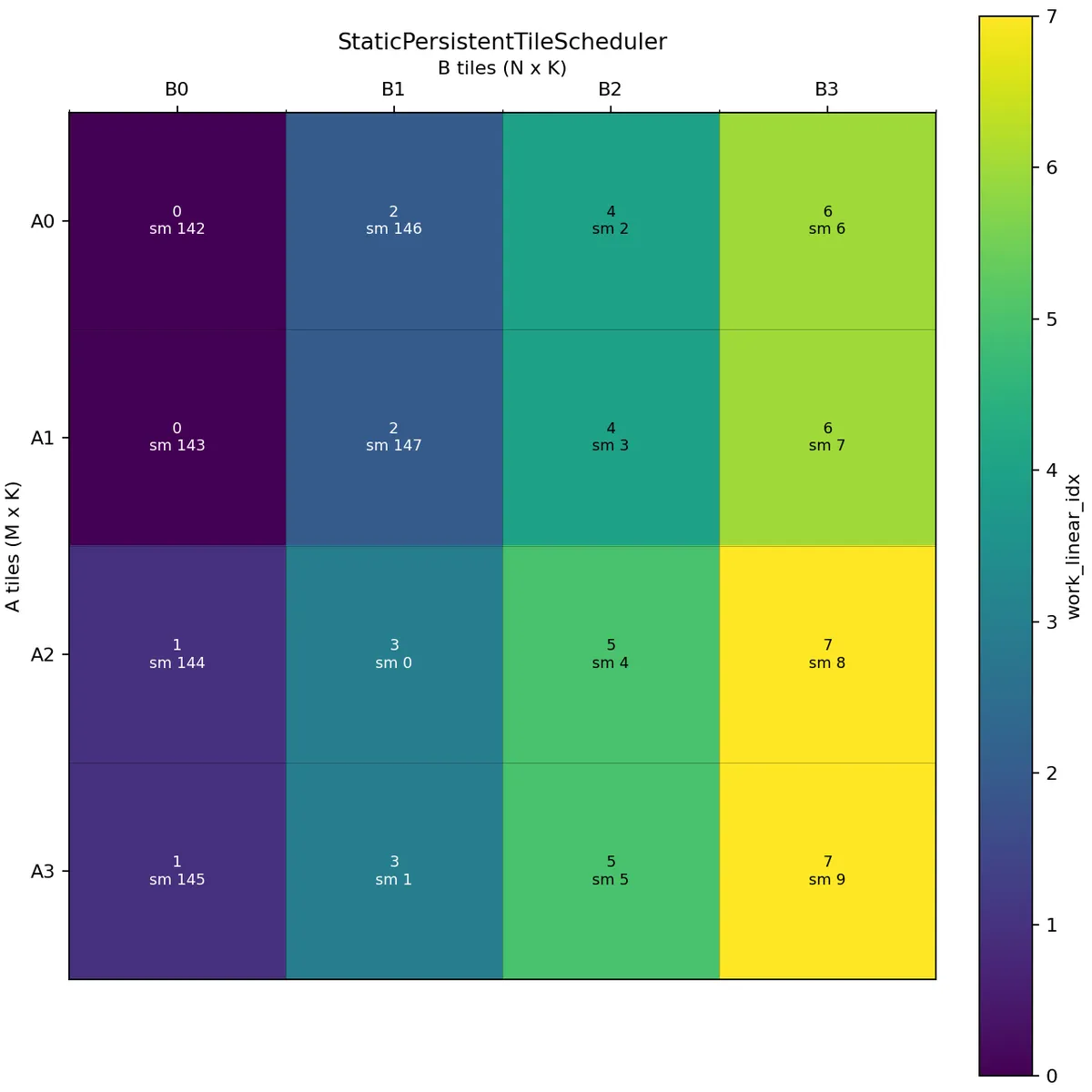
Here two CTAs in the same cluster share the same work linear index. The scheduler then adds the CTA's cta_id_in_cluster to produce the physical CTA tile coordinate. The correct offset within the MMA tile is handled by the partitioning code, which uses the CTA's rank within the cluster.
One important detail is that max_active_clusters counts active clusters, not individual CTAs. For cluster_shape=(2, 1, 1), each persistent cluster contains two CTAs in the M direction.
Swizzle works similarly as in the non-cluster case:
Conclusion
I hope this blogpost can serve as a good visual explanation of StaticPersistentTileScheduler. Please see the following blog by Colfax for a more detailed explanation from a different angle. Please check out Verda if you want to learn more about GPU programming. They provided me with compute for this blogpost.